Turn a still image into an animated video clip by describing the motion you want.
Image-to-video generation takes a still image as the starting frame and animates it based on your prompt. The AI preserves the visual content of your image and adds the motion you describe.
How to generate a video from an image
1
Select Video as your artifact type
On the home dashboard, click the artifact picker and select Generate Videos.
2
Configure your settings
Set the aspect ratio and audio toggle. The same options apply as text-to-video generation.
Muted videos use half the credits. Turn audio off if you do not need spoken dialogue or ambient sound.
3
Attach your starting image
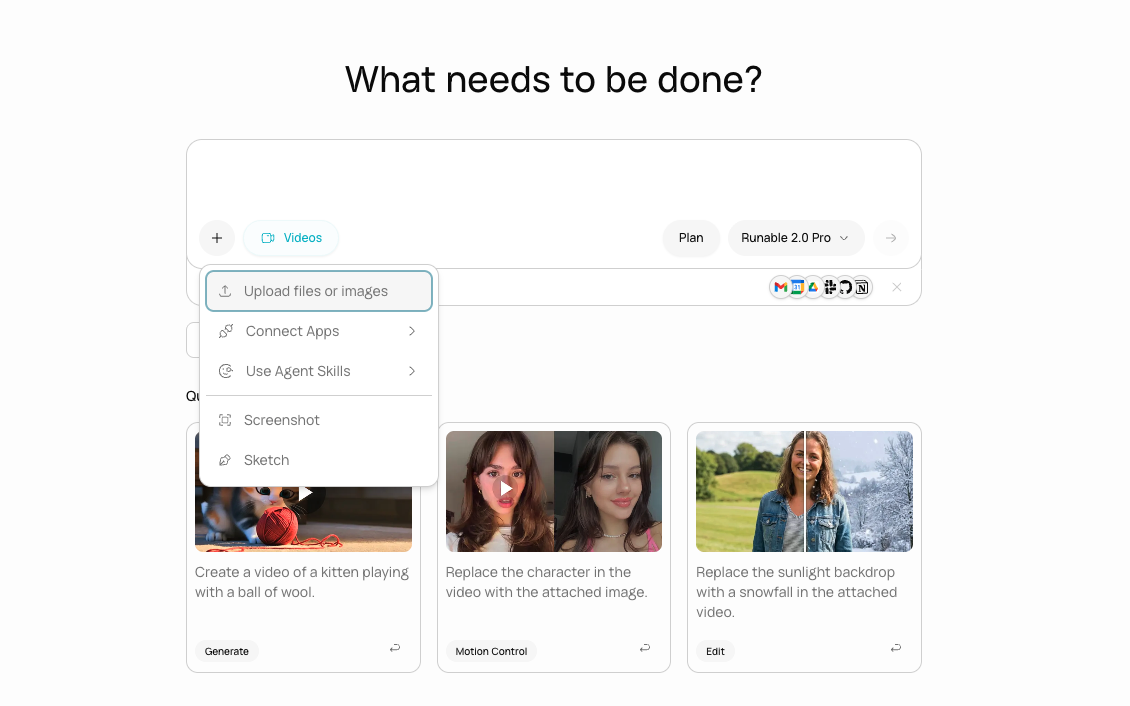
Click the + button in the input bar and upload the image you want to animate. This image becomes the first frame of the video.
An image attached to the input bar, ready to be animated.
4
Describe the motion
Type a prompt describing what should happen in the video. Focus on motion, not on what the image looks like (the AI already has the image).
Animate a product photo for an Instagram Reel
Bring a storefront photo to life for a website hero
Animate a food flat lay for a social media ad
5
Wait for generation
The agent generates the video using your image as the starting frame. A placeholder appears on the canvas while it processes.
6
Review and refine
The video appears on the canvas. Click to play. If the motion is not right, describe what to change or generate again with an updated prompt.
A→B transitions
You can provide both a starting image and an ending image. The AI generates a smooth transition between the two states.
1
Attach both images
Upload two images: one for the start and one for the end. Mention in your prompt which is the start and which is the end.
2
Describe the transition
Explain what changes between the two frames.
Product reveal: closed box to open box
Before and after: empty room to furnished
A→B transitions work best when the two images share a similar composition and the change between them is clear: a position shift, a state change, or a visual transformation.
What you cannot do
You cannot use a video as the source (image only). Use Edit a Video for video-to-video changes.
You cannot control exact frame-by-frame motion. The AI interprets your prompt.
You cannot set a specific frame rate. The model determines this.
Next steps
Motion Control
Transfer motion from a reference video onto your image for precise control.
Edit a Video
Change the style or content of an existing video clip.
{"docsConfig":{"theme":"mint","$schema":"https://mintlify.com/docs.json","name":"Runable Docs","description":"Docs about Runable's features, best practices, How to videos etc","colors":{"primary":"#00b6b6","light":"#00b7ca","dark":"#00b7ca"},"logo":"https://mintcdn.com/runableinc/2u9LiVAxGPWubXtF/images/blacklogopng.png?fit=max\u0026auto=format\u0026n=2u9LiVAxGPWubXtF\u0026q=85\u0026s=618a5673482fc6c5563a760a9ca7bb4f","favicon":"https://mintcdn.com/runableinc/gB6o39YgqwosUHnl/images/logo_v2_light.ico?fit=max\u0026auto=format\u0026n=gB6o39YgqwosUHnl\u0026q=85\u0026s=1a7863dd1ccd99a640918707ec3b1954","appearance":{"default":"system"},"background":{"color":{"light":"#fdfdfd","dark":"#212121"}},"navbar":{"links":[{"href":"mailto:support@runable.com","label":"Support"}],"primary":{"type":"button","label":"Dashboard","href":"https://dashboard.mintlify.com"}},"footer":{"socials":{"x":"https://x.com/runable_hq","github":"https://github.com/runablehq","linkedin":"https://linkedin.com/company/runablehq"}},"seo":{"indexing":"all"},"integrations":{"posthog":{"apiKey":"phc_az2NVDPM261mGOjxMMdhubjHjVxB41aCoXDaQweGraT"}},"contextual":{"options":["copy","view","chatgpt","claude","perplexity","mcp","cursor","vscode"],"display":"header"},"styling":{"latex":true},"navigation":{"global":{"anchors":[{"anchor":"Blogs","icon":"newspaper","href":"https://runable.com/blogs"}]},"pages":[]}},"deployment":{"deploymentMetadataValue":{"subdomain":"runableinc","hasAudioNarration":false,"actualSubdomain":"runableinc","customDomains":[],"gitSource":{"type":"github","owner":"mintlify-community","repo":"docs-runableinc-238a7879","deployBranch":"main","contentDirectory":"","isPrivate":true,"mountPath":"","label":""},"entitlements":{"AI_CHAT":{"status":"DISABLED"}},"buildId":"6a8be61b885b9f28b7f8a3eb","clientVersion":"0.0.4270","searchFilterCounts":[{"language":"default","tag":"Generate Media","count":22},{"language":"default","tag":"Create Content","count":14},{"language":"default","tag":"AI Chat","count":12},{"language":"default","tag":"Build Websites","count":11},{"language":"default","tag":"Basic Info For Must Have","count":9},{"language":"default","tag":"AI Audio","count":9},{"language":"default","tag":"Reference","count":8},{"language":"default","tag":"Meet","count":8},{"language":"default","tag":"AI Images","count":7},{"language":"default","tag":"Mobile app","count":6}]},"assistantConfig":{"enableAskAiButton":false,"enableStarterQuestions":false,"enableAskAiSearchBar":true,"deflection":{"enabled":true,"email":"support@runable.com"}},"basePath":"","hasChatPermissions":false,"hasWebMcpPermissions":false,"toggles":[{"name":"kill-isr","enabled":true,"variant":{"name":"disabled","enabled":false,"feature_enabled":true},"impressionData":false},{"name":"custom-rbac-roles","enabled":true,"variant":{"name":"disabled","enabled":false,"feature_enabled":true},"impressionData":false},{"name":"agent-mintlify-slack","enabled":true,"variant":{"name":"disabled","enabled":false,"feature_enabled":true},"impressionData":false},{"name":"agent-integrations-settings","enabled":true,"variant":{"name":"disabled","enabled":false,"feature_enabled":true},"impressionData":false},{"name":"rbac-expansion","enabled":true,"variant":{"name":"disabled","enabled":false,"feature_enabled":true},"impressionData":false},{"name":"automations-pr-grouping","enabled":true,"variant":{"name":"disabled","enabled":false,"feature_enabled":true},"impressionData":false},{"name":"custom-prefix","enabled":true,"variant":{"name":"disabled","enabled":false,"feature_enabled":true},"impressionData":false},{"name":"analytics-v7","enabled":true,"variant":{"name":"disabled","enabled":false,"feature_enabled":true},"impressionData":false},{"name":"user-flows-analytics","enabled":true,"variant":{"name":"disabled","enabled":false,"feature_enabled":true},"impressionData":false},{"name":"no-publish-flow","enabled":true,"variant":{"name":"disabled","enabled":false,"feature_enabled":true},"impressionData":false},{"name":"workos-onboarding","enabled":true,"variant":{"name":"disabled","enabled":false,"feature_enabled":true},"impressionData":false},{"name":"snapshot-serving-live","enabled":true,"variant":{"name":"disabled","enabled":false,"feature_enabled":true},"impressionData":false},{"name":"stripTemperatureMiddleware","enabled":true,"variant":{"name":"disabled","enabled":false,"feature_enabled":true},"impressionData":false},{"name":"support-platform-pylon-zendesk","enabled":true,"variant":{"name":"disabled","enabled":false,"feature_enabled":true},"impressionData":false},{"name":"snapshot-serving","enabled":true,"variant":{"name":"disabled","enabled":false,"feature_enabled":true},"impressionData":false},{"name":"instant-rollback","enabled":true,"variant":{"name":"disabled","enabled":false,"feature_enabled":true},"impressionData":false},{"name":"granular-notifications-server","enabled":true,"variant":{"name":"disabled","enabled":false,"feature_enabled":true},"impressionData":false},{"name":"granular-notifications","enabled":true,"variant":{"name":"disabled","enabled":false,"feature_enabled":true},"impressionData":false},{"name":"automations-fable","enabled":true,"variant":{"name":"disabled","enabled":false,"feature_enabled":true},"impressionData":false},{"name":"fixed-ai-action-pricing","enabled":true,"variant":{"name":"disabled","enabled":false,"feature_enabled":true},"impressionData":false},{"name":"site-roles","enabled":true,"variant":{"name":"disabled","enabled":false,"feature_enabled":true},"impressionData":false},{"name":"automation-resolve-merge-conflict","enabled":true,"variant":{"name":"disabled","enabled":false,"feature_enabled":true},"impressionData":false},{"name":"scoped-publishing","enabled":true,"variant":{"name":"disabled","enabled":false,"feature_enabled":true},"impressionData":false},{"name":"mintql","enabled":true,"variant":{"name":"disabled","enabled":false,"feature_enabled":true},"impressionData":false},{"name":"page-level-analytics","enabled":true,"variant":{"name":"disabled","enabled":false,"feature_enabled":true},"impressionData":false},{"name":"editor-version-history-v2","enabled":true,"variant":{"name":"disabled","enabled":false,"feature_enabled":true},"impressionData":false},{"name":"billing-page-v2","enabled":true,"variant":{"name":"disabled","enabled":false,"feature_enabled":true},"impressionData":false},{"name":"full-page-search","enabled":true,"variant":{"name":"disabled","enabled":false,"feature_enabled":true},"impressionData":false},{"name":"workspace-projects","enabled":true,"variant":{"name":"disabled","enabled":false,"feature_enabled":true},"impressionData":false},{"name":"assistant-v5","enabled":true,"variant":{"name":"disabled","enabled":false,"feature_enabled":true},"impressionData":false},{"name":"fork-pr-previews","enabled":true,"variant":{"name":"disabled","enabled":false,"feature_enabled":true},"impressionData":false},{"name":"revalidation-jwt","enabled":true,"variant":{"name":"disabled","enabled":false,"feature_enabled":true},"impressionData":false},{"name":"workos-sso-scim","enabled":true,"variant":{"name":"disabled","enabled":false,"feature_enabled":true},"impressionData":false},{"name":"hobby-abuse-scan","enabled":true,"variant":{"name":"disabled","enabled":false,"feature_enabled":true},"impressionData":false},{"name":"dashboard-inbox","enabled":true,"variant":{"name":"disabled","enabled":false,"feature_enabled":true},"impressionData":false},{"name":"workos-signup","enabled":true,"variant":{"name":"disabled","enabled":false,"feature_enabled":true},"impressionData":false},{"name":"turbopuffer-dual-write","enabled":true,"variant":{"name":"disabled","enabled":false,"feature_enabled":true},"impressionData":false},{"name":"workos-enabled","enabled":true,"variant":{"name":"disabled","enabled":false,"feature_enabled":true},"impressionData":false},{"name":"approve-review-flow","enabled":true,"variant":{"name":"disabled","enabled":false,"feature_enabled":true},"impressionData":false},{"name":"editor-metadata","enabled":true,"variant":{"name":"disabled","enabled":false,"feature_enabled":true},"impressionData":false},{"name":"sso-setup-deadline-banner","enabled":true,"variant":{"name":"disabled","enabled":false,"feature_enabled":true},"impressionData":false},{"name":"turbopuffer-serve","enabled":true,"variant":{"name":"disabled","enabled":false,"feature_enabled":true},"impressionData":false},{"name":"live-agents","enabled":true,"variant":{"name":"disabled","enabled":false,"feature_enabled":true},"impressionData":false},{"name":"starter-pricing","enabled":true,"variant":{"name":"control","enabled":true,"payload":{"type":"string","value":"control"},"feature_enabled":true},"impressionData":false},{"name":"llms-txt-v2","enabled":true,"variant":{"name":"disabled","enabled":false,"feature_enabled":true},"impressionData":false},{"name":"wildcard-email-auth","enabled":true,"variant":{"name":"disabled","enabled":false,"feature_enabled":true},"impressionData":false}],"googleFontsInlined":false},"customCss":[]}
{"page":{"pagePath":"generate-from-an-image","slug":"/generate-from-an-image","pageMetadata":{"title":"Generate from an Image","description":"Turn a still image into an animated video clip by describing the motion you want.","href":"/generate-from-an-image"},"description":{"compiledSource":"\"use strict\";\nconst {jsx: _jsx} = arguments[0];\nconst {useMDXComponents: _provideComponents} = arguments[0];\nfunction _createMdxContent(props) {\n const _components = {\n p: \"p\",\n ..._provideComponents(),\n ...props.components\n };\n return _jsx(_components.p, {\n children: \"Turn a still image into an animated video clip by describing the motion you want.\"\n });\n}\nfunction MDXContent(props = {}) {\n const {wrapper: MDXLayout} = {\n ..._provideComponents(),\n ...props.components\n };\n return MDXLayout ? _jsx(MDXLayout, {\n ...props,\n children: _jsx(_createMdxContent, {\n ...props\n })\n }) : _createMdxContent(props);\n}\nreturn {\n default: MDXContent\n};\n","frontmatter":{},"scope":{}},"pageType":"default","mdx":{"mdxSource":{"compiledSource":"\"use strict\";const{Fragment:_Fragment,jsx:_jsx,jsxs:_jsxs}=arguments[0];const{useMDXComponents:_provideComponents}=arguments[0];function _createMdxContent(props){const _components={a:`a`,li:`li`,p:`p`,strong:`strong`,ul:`ul`,..._provideComponents(),...props.components},{Card,CardGroup,Frame,Heading,Note,OptimizedImage,Prompt,Step,Steps,Tip}=_components;if(!Card)_missingMdxReference(`Card`,true);if(!CardGroup)_missingMdxReference(`CardGroup`,true);if(!Frame)_missingMdxReference(`Frame`,true);if(!Heading)_missingMdxReference(`Heading`,true);if(!Note)_missingMdxReference(`Note`,true);if(!OptimizedImage)_missingMdxReference(`OptimizedImage`,true);if(!Prompt)_missingMdxReference(`Prompt`,true);if(!Step)_missingMdxReference(`Step`,true);if(!Steps)_missingMdxReference(`Steps`,true);if(!Tip)_missingMdxReference(`Tip`,true);return _jsxs(_Fragment,{children:[_jsx(_components.p,{children:`Image-to-video generation takes a still image as the starting frame and animates it based on your prompt. The AI preserves the visual content of your image and adds the motion you describe.`}),`\n`,_jsx(Heading,{level:`2`,id:`how-to-generate-a-video-from-an-image`,children:`How to generate a video from an image`}),`\n`,_jsxs(Steps,{children:[_jsx(Step,{title:`Select Video as your artifact type`,children:_jsxs(_components.p,{children:[`On the home dashboard, click the artifact picker and select `,_jsx(_components.strong,{children:`Generate Videos`}),`.`]})}),_jsxs(Step,{title:`Configure your settings`,children:[_jsx(_components.p,{children:`Set the aspect ratio and audio toggle. The same options apply as text-to-video generation.`}),_jsx(Tip,{children:_jsx(_components.p,{children:`Muted videos use half the credits. Turn audio off if you do not need spoken dialogue or ambient sound.`})})]}),_jsxs(Step,{title:`Attach your starting image`,children:[_jsxs(_components.p,{children:[`Click the `,_jsx(_components.strong,{children:`+`}),` button in the input bar and upload the image you want to animate. This image becomes the first frame of the video.`]}),_jsx(Frame,{caption:`An image attached to the input bar, ready to be animated.`,children:_jsx(OptimizedImage,{src:`https://pub-51091dcf1e9d4b04bb2e74f489c4f346.r2.dev/5801e4db1861fd7cecea0b8b8c18ea50f4753c3a6439be597c57ac037df9d3d2.png`,alt:`Input bar with an uploaded image thumbnail visible, ready for a video generation prompt`})})]}),_jsxs(Step,{title:`Describe the motion`,children:[_jsx(_components.p,{children:`Type a prompt describing what should happen in the video. Focus on motion, not on what the image looks like (the AI already has the image).`}),_jsx(Prompt,{description:`Animate a product photo for an Instagram Reel`,children:`I uploaded a photo of our coffee bag on a marble countertop. Slowly zoom in on the bag over 5 seconds. Add a subtle steam effect rising from behind it as if there is a fresh cup just out of frame. Warm lighting shifts slightly from left to right. 9:16 for Instagram Reels. Generate muted.\n`}),_jsx(Prompt,{description:`Bring a storefront photo to life for a website hero`,children:`I uploaded a photo of our gym's exterior at dusk. Animate the scene: turn on the interior lights gradually, add a few people walking past on the sidewalk, and add a subtle flicker to the neon sign. 8 seconds, 16:9. Generate with audio, city street ambiance.\n`}),_jsx(Prompt,{description:`Animate a food flat lay for a social media ad`,children:`I uploaded a top-down photo of our grain bowl. Animate the tahini drizzle slowly pouring across the bowl from top to bottom over 6 seconds. The rest of the food stays still. Warm natural lighting. 1:1 square. Generate muted.\n`})]}),_jsx(Step,{title:`Wait for generation`,children:_jsx(_components.p,{children:`The agent generates the video using your image as the starting frame. A placeholder appears on the canvas while it processes.`})}),_jsx(Step,{title:`Review and refine`,children:_jsx(_components.p,{children:`The video appears on the canvas. Click to play. If the motion is not right, describe what to change or generate again with an updated prompt.`})})]}),`\n`,_jsx(Heading,{level:`2`,id:`a→b-transitions`,children:`A→B transitions`}),`\n`,_jsx(_components.p,{children:`You can provide both a starting image and an ending image. The AI generates a smooth transition between the two states.`}),`\n`,_jsxs(Steps,{children:[_jsx(Step,{title:`Attach both images`,children:_jsx(_components.p,{children:`Upload two images: one for the start and one for the end. Mention in your prompt which is the start and which is the end.`})}),_jsxs(Step,{title:`Describe the transition`,children:[_jsx(_components.p,{children:`Explain what changes between the two frames.`}),_jsx(Prompt,{description:`Product reveal: closed box to open box`,children:`Start frame is the closed gift box. End frame is the open box with the product visible inside. Generate a smooth 5-second transition where the lid lifts off and the camera tilts down to reveal the contents. Soft studio lighting.\n`}),_jsx(Prompt,{description:`Before and after: empty room to furnished`,children:`Start frame is the empty room. End frame is the same room fully furnished. Generate an 8-second morph transition where the furniture fades in piece by piece. Same camera angle throughout.\n`})]})]}),`\n`,_jsx(Note,{children:_jsx(_components.p,{children:`A→B transitions work best when the two images share a similar composition and the change between them is clear: a position shift, a state change, or a visual transformation.`})}),`\n`,_jsx(Heading,{level:`2`,id:`what-you-cannot-do`,children:`What you cannot do`}),`\n`,_jsxs(_components.ul,{children:[`\n`,_jsxs(_components.li,{children:[`You cannot use a video as the source (image only). Use `,_jsx(_components.a,{href:`/edit-a-video`,children:`Edit a Video`}),` for video-to-video changes.`]}),`\n`,_jsx(_components.li,{children:`You cannot control exact frame-by-frame motion. The AI interprets your prompt.`}),`\n`,_jsx(_components.li,{children:`You cannot set a specific frame rate. The model determines this.`}),`\n`]}),`\n`,_jsx(Heading,{level:`2`,id:`next-steps`,children:`Next steps`}),`\n`,_jsxs(CardGroup,{cols:2,children:[_jsx(Card,{title:`Motion Control`,icon:`person-walking`,href:`/motion-control`,children:_jsx(_components.p,{children:`Transfer motion from a reference video onto your image for precise control.`})}),_jsx(Card,{title:`Edit a Video`,icon:`pen-to-square`,href:`/edit-a-video`,children:_jsx(_components.p,{children:`Change the style or content of an existing video clip.`})})]})]})}function MDXContent(props={}){const{wrapper:MDXLayout}={..._provideComponents(),...props.components};return MDXLayout?_jsx(MDXLayout,{...props,children:_jsx(_createMdxContent,{...props})}):_createMdxContent(props)}return{default:MDXContent};function _missingMdxReference(id,component){throw new Error(`Expected `+(component?`component`:`object`)+\" `\"+id+\"` to be defined: you likely forgot to import, pass, or provide it.\")}","frontmatter":{},"scope":{"config":{},"pageMetadata":{"title":"Generate from an Image","description":"Turn a still image into an animated video clip by describing the motion you want.","href":"/generate-from-an-image"}}},"mdxSourceWithNoJs":null},"mdxExtracts":{"tableOfContents":[{"title":"How to generate a video from an image","slug":"how-to-generate-a-video-from-an-image","depth":2,"children":[]},{"title":"A→B transitions","slug":"a→b-transitions","depth":2,"children":[]},{"title":"What you cannot do","slug":"what-you-cannot-do","depth":2,"children":[]},{"title":"Next steps","slug":"next-steps","depth":2,"children":[]}],"codeExamples":{}},"jsLinks":[],"subdomain":"runableinc","siteName":"Runable Docs","title":"Generate from an Image - Runable Docs","navMaps":{"firstHrefInVersion":{},"firstHrefInLanguage":{}},"lastModified":"2026-03-18T14:56:24.187Z","originalFileLocation":"generate-from-an-image.mdx"},"headHtml":"\u003cscript data-mint-head>(function(){var d=document.documentElement,p=null;if(!p){try{p=localStorage.getItem(\"isDarkMode\")}catch(e){}if(p==='true')p='dark';else if(p==='false')p='light';if(p!=='light'\u0026\u0026p!=='dark'\u0026\u0026p!=='system')p=\"system\"}var r=p==='system'?(matchMedia(\"(prefers-color-scheme: dark)\").matches?'dark':'light'):p;d.classList.remove(r==='dark'?'light':'dark');d.classList.add(r);d.setAttribute(\"data-theme-preference\",p)})();\u003c/script>\u003cmeta data-mint-head name=\"description\" content=\"Turn a still image into an animated video clip by describing the motion you want.\">\u003cmeta data-mint-head name=\"application-name\" content=\"Runable Docs\">\u003cmeta data-mint-head name=\"generator\" content=\"Mintlify\">\u003clink data-mint-head rel=\"icon\" type=\"image/png\" sizes=\"192x192\" href=\"/mintlify-assets/_mintlify/favicons/runableinc/jnI0J7MBIXHdLoiD/_generated/favicon/android-chrome-192x192.png\" media=\"(prefers-color-scheme: light)\">\u003clink data-mint-head rel=\"apple-touch-icon\" type=\"image/png\" sizes=\"180x180\" href=\"/mintlify-assets/_mintlify/favicons/runableinc/jnI0J7MBIXHdLoiD/_generated/favicon/apple-touch-icon.png\">\u003clink data-mint-head rel=\"icon\" type=\"image/png\" sizes=\"16x16\" href=\"/mintlify-assets/_mintlify/favicons/runableinc/jnI0J7MBIXHdLoiD/_generated/favicon/favicon-16x16.png\" media=\"(prefers-color-scheme: light)\">\u003clink data-mint-head rel=\"icon\" type=\"image/png\" sizes=\"32x32\" href=\"/mintlify-assets/_mintlify/favicons/runableinc/jnI0J7MBIXHdLoiD/_generated/favicon/favicon-32x32.png\" media=\"(prefers-color-scheme: light)\">\u003clink data-mint-head rel=\"shortcut icon\" type=\"image/x-icon\" href=\"/mintlify-assets/_mintlify/favicons/runableinc/jnI0J7MBIXHdLoiD/_generated/favicon/favicon.ico\" media=\"(prefers-color-scheme: light)\">\u003clink data-mint-head rel=\"icon\" type=\"image/png\" sizes=\"192x192\" href=\"/mintlify-assets/_mintlify/favicons/runableinc/jnI0J7MBIXHdLoiD/_generated/favicon-dark/android-chrome-192x192.png\" media=\"(prefers-color-scheme: dark)\">\u003clink data-mint-head rel=\"icon\" type=\"image/png\" sizes=\"16x16\" href=\"/mintlify-assets/_mintlify/favicons/runableinc/jnI0J7MBIXHdLoiD/_generated/favicon-dark/favicon-16x16.png\" media=\"(prefers-color-scheme: dark)\">\u003clink data-mint-head rel=\"icon\" type=\"image/png\" sizes=\"32x32\" href=\"/mintlify-assets/_mintlify/favicons/runableinc/jnI0J7MBIXHdLoiD/_generated/favicon-dark/favicon-32x32.png\" media=\"(prefers-color-scheme: dark)\">\u003clink data-mint-head rel=\"shortcut icon\" type=\"image/x-icon\" href=\"/mintlify-assets/_mintlify/favicons/runableinc/jnI0J7MBIXHdLoiD/_generated/favicon-dark/favicon.ico\" media=\"(prefers-color-scheme: dark)\">\u003cmeta data-mint-head property=\"og:title\" content=\"Generate from an Image - Runable Docs\">\u003cmeta data-mint-head property=\"og:description\" content=\"Turn a still image into an animated video clip by describing the motion you want.\">\u003cmeta data-mint-head property=\"og:site_name\" content=\"Runable Docs\">\u003cmeta data-mint-head property=\"og:url\" content=\"https://runableinc.mintlify.app/generate-from-an-image\">\u003cmeta data-mint-head property=\"og:type\" content=\"website\">\u003cmeta data-mint-head property=\"og:image\" content=\"https://runableinc.mintlify.site/_mintlify/api/og/v2?division=AI+Videos\u0026amp;title=Generate+from+an+Image\u0026amp;description=Turn+a+still+image+into+an+animated+video+clip+by+describing+the+motion+you+want.\u0026amp;theme=701b6b0de71927d4043a61f7\u0026amp;signature=cc3c894aa64b17df4886dbf6d7025e73465c103d6349d4dfbd8747327017e191\">\u003cmeta data-mint-head property=\"og:image:width\" content=\"1200\">\u003cmeta data-mint-head property=\"og:image:height\" content=\"630\">\u003cmeta data-mint-head name=\"twitter:card\" content=\"summary_large_image\">\u003cmeta data-mint-head name=\"twitter:title\" content=\"Generate from an Image - Runable Docs\">\u003cmeta data-mint-head name=\"twitter:description\" content=\"Turn a still image into an animated video clip by describing the motion you want.\">\u003cmeta data-mint-head name=\"twitter:image\" content=\"https://runableinc.mintlify.site/_mintlify/api/og/v2?division=AI+Videos\u0026amp;title=Generate+from+an+Image\u0026amp;description=Turn+a+still+image+into+an+animated+video+clip+by+describing+the+motion+you+want.\u0026amp;theme=701b6b0de71927d4043a61f7\u0026amp;signature=cc3c894aa64b17df4886dbf6d7025e73465c103d6349d4dfbd8747327017e191\">\u003cmeta data-mint-head name=\"twitter:image:width\" content=\"1200\">\u003cmeta data-mint-head name=\"twitter:image:height\" content=\"630\">\u003cmeta data-mint-head name=\"msapplication-config\" content=\"/mintlify-assets/_mintlify/favicons/runableinc/jnI0J7MBIXHdLoiD/_generated/favicon/browserconfig.xml\">\u003cmeta data-mint-head name=\"apple-mobile-web-app-title\" content=\"Runable Docs\">\u003cmeta data-mint-head name=\"msapplication-TileColor\" content=\"#00b6b6\">\u003clink data-mint-head rel=\"canonical\" href=\"https://runableinc.mintlify.app/generate-from-an-image\">\u003clink data-mint-head rel=\"alternate\" type=\"application/xml\" href=\"/sitemap.xml\">\u003clink data-mint-head rel=\"alternate\" type=\"text/markdown\" href=\"/generate-from-an-image.md\">\u003cscript data-mint-head type=\"application/ld+json\">{\"@context\":\"https://schema.org\",\"@graph\":[{\"@type\":\"Organization\",\"@id\":\"https://runableinc.mintlify.app/#organization\",\"name\":\"Runable Docs\",\"url\":\"https://runableinc.mintlify.app\",\"logo\":{\"@type\":\"ImageObject\",\"url\":\"https://mintcdn.com/runableinc/2u9LiVAxGPWubXtF/images/blacklogopng.png?fit=max\u0026auto=format\u0026n=2u9LiVAxGPWubXtF\u0026q=85\u0026s=618a5673482fc6c5563a760a9ca7bb4f\"}},{\"@type\":\"WebSite\",\"@id\":\"https://runableinc.mintlify.app#website\",\"name\":\"Runable Docs\",\"url\":\"https://runableinc.mintlify.app\",\"publisher\":{\"@id\":\"https://runableinc.mintlify.app/#organization\"}},{\"@type\":\"WebPage\",\"@id\":\"https://runableinc.mintlify.app/generate-from-an-image#webpage\",\"url\":\"https://runableinc.mintlify.app/generate-from-an-image\",\"name\":\"Generate from an Image\",\"description\":\"Turn a still image into an animated video clip by describing the motion you want.\",\"dateModified\":\"2026-03-18T14:56:24.187Z\",\"isPartOf\":{\"@id\":\"https://runableinc.mintlify.app#website\"},\"breadcrumb\":{\"@id\":\"https://runableinc.mintlify.app/generate-from-an-image#breadcrumb\"}},{\"@type\":\"BreadcrumbList\",\"@id\":\"https://runableinc.mintlify.app/generate-from-an-image#breadcrumb\",\"itemListElement\":[{\"@type\":\"ListItem\",\"position\":1,\"name\":\"Generate Media\",\"item\":\"https://runableinc.mintlify.app/overview-what-is-ai-images\"},{\"@type\":\"ListItem\",\"position\":2,\"name\":\"AI Videos\",\"item\":\"https://runableinc.mintlify.app/overview-what-is-ai-videos\"},{\"@type\":\"ListItem\",\"position\":3,\"name\":\"Generate from an Image\",\"item\":\"https://runableinc.mintlify.app/generate-from-an-image\"}]},{\"@type\":[\"Article\",\"TechArticle\"],\"@id\":\"https://runableinc.mintlify.app/generate-from-an-image#article\",\"headline\":\"Generate from an Image\",\"name\":\"Generate from an Image\",\"description\":\"Turn a still image into an animated video clip by describing the motion you want.\",\"url\":\"https://runableinc.mintlify.app/generate-from-an-image\",\"mainEntityOfPage\":{\"@id\":\"https://runableinc.mintlify.app/generate-from-an-image#webpage\"},\"dateModified\":\"2026-03-18T14:56:24.187Z\",\"publisher\":{\"@id\":\"https://runableinc.mintlify.app/#organization\"},\"isPartOf\":{\"@id\":\"https://runableinc.mintlify.app#website\"}}]}\u003c/script>\u003cscript data-mint-head type=\"application/ld+json\">{\"@context\":\"https://schema.org\",\"@type\":\"WebSite\",\"name\":\"Runable Docs\",\"publisher\":{\"@type\":\"Organization\",\"name\":\"Runable Docs\"},\"provider\":{\"@type\":\"Organization\",\"name\":\"Mintlify\",\"url\":\"https://mintlify.com\"}}\u003c/script>","agentPointerHref":"/generate-from-an-image.md","siteName":"Runable Docs","nav":{"global":{"anchors":[{"anchor":"Blogs","icon":"newspaper","href":"https://runable.com/blogs"}]},"pages":[{"group":"Introduction","pages":[{"title":"Welcome to Runable 2.0","href":"/index"},{"title":"Quickstart","href":"/quickstart"},{"title":"Plans \u0026 Credits","href":"/plans-and-credits"}]},{"group":"Skills and memory","pages":[{"group":"Skills","pages":[{"title":"Overview: What are Skills","sidebarTitle":"Overview","href":"/overview-what-are-skills"},{"title":"Enable \u0026 Disable Skills","sidebarTitle":"Enable \u0026 Disable Skills","href":"/enable-and-disable-skills"},{"title":"Official Skills vs Custom Skills","sidebarTitle":"Official Skills vs Custom Skills","href":"/official-vs-custom-skills"}]},{"group":"Memory","pages":[{"title":"Overview: What is Memory","sidebarTitle":"Overview","href":"/overview-what-is-memory"}]}]},{"group":"RunClaw🦞","pages":[{"title":"Run Meet","sidebarTitle":"Overview","icon":"video","href":"/runclaw"},{"title":"Telegram","href":"/runclaw/telegram"},{"title":"Slack","href":"/runclaw/slack"},{"title":"Discord","href":"/runclaw/discord"},{"title":"iMessage","href":"/runclaw/imessage"},{"title":"Microsoft Teams","href":"/runclaw/microsoft-teams"}]},{"group":"Core Concepts","pages":[{"title":"How the Agent Works","href":"/how-the-agent-works"},{"title":"Agent Mode vs Chat Mode vs Plan Mode","href":"/agent-mode-vs-chat-mode-vs-plan-mode"},{"title":"Branching \u0026 Rollback","href":"/branching-and-rollback"},{"title":"Choosing Your AI Model","href":"/choosing-your-ai-model"}]},{"group":"Basic Info For Must Have","pages":[{"title":"How Credits Work","icon":"wallet","href":"/basic-info-for-getting-started/untitled-page"},{"title":"Subscriptions Explained","icon":"credit-card","href":"/basic-info-for-getting-started/title-subscriptions-explained-description-understand-how-runable-subscriptions-work-whats-included-how-billing-cycles-operate-and-how-to-manage-your-subscription-icon-credit-card-subscriptions-exp"},{"title":"Lifetime Credits vs Monthly Credits","icon":"coins","href":"/basic-info-for-getting-started/untitled-page-2"},{"title":"Website Hosting","icon":"globe","href":"/basic-info-for-getting-started/untitled-page-3"},{"title":"Prompt Engineering Guide","icon":"sparkles","href":"/basic-info-for-getting-started/untitled-page-4"},{"title":"AI Limitations","icon":"brain-circuit","href":"/basic-info-for-getting-started/untitled-page-5"},{"title":"Understanding Credit Usage","icon":"wallet","href":"/basic-info-for-getting-started/untitled-page-6"},{"title":"Common Mistakes \u0026 Best Practices","icon":"sensor-alert","href":"/basic-info-for-getting-started/untitled-page-7"},{"title":"Billing \u0026 Payments FAQ","icon":"credit-card","href":"/basic-info-for-getting-started/untitled-page-8"}]},{"group":"Create Content","pages":[{"group":"AI Slides","pages":[{"title":"Overview: What is AI Slides","sidebarTitle":"Overview","href":"/overview-what-is-ai-slides"},{"title":"Generate a Presentation","href":"/generate-a-presentation"},{"title":"Edit Slides (HTML Format)","href":"/edit-slides-html-format"},{"title":"Edit Slides (Image Format)","href":"/edit-slides-image-format"},{"title":"Export to PDF or PPTX","href":"/export-to-pdf-or-pptx"}]},{"group":"AI Reports","pages":[{"title":"Overview: What is AI Reports","sidebarTitle":"Overview","href":"/overview-what-is-ai-reports"},{"title":"Generate a Report","href":"/generate-a-report"},{"title":"Export to PDF","href":"/export-to-pdf"}]},{"group":"AI Spreadsheets","pages":[{"title":"AI Spreadsheets","sidebarTitle":"Overview","href":"/overview"},{"title":"Upload \u0026 View XLSX / CSV","href":"/upload-and-view-xlsx-csv"},{"title":"Export","href":"/export"}]},{"group":"AI Carousel","pages":[{"title":"AI Carousel","sidebarTitle":"Overview","href":"/overview-what-is-ai-carousel"},{"title":"Generate a Carousel","href":"/generate-a-carousel"},{"title":"Edit a Carousel","href":"/edit-a-carousel"}]}]},{"group":"Generate Media","pages":[{"group":"AI Images","pages":[{"title":"AI Images","sidebarTitle":"Overview","href":"/overview-what-is-ai-images"},{"title":"Generate an Image","href":"/generate-an-image"},{"title":"Remove Background","href":"/remove-background"},{"title":"Replace Background","href":"/replace-background"},{"title":"Upscale an Image","href":"/upscale-an-image"},{"title":"Edit Text in Images","href":"/edit-text-in-images"},{"title":"Mark \u0026 Edit (Region Editing)","href":"/mark-and-edit"}]},{"group":"AI Videos","pages":[{"title":"AI Videos","sidebarTitle":"Overview","href":"/overview-what-is-ai-videos"},{"title":"Generate from Text","description":"Create a video clip from a text prompt describing the scene, motion, and style.","href":"/generate-from-text"},{"title":"Generate from an Image","href":"/generate-from-an-image"},{"title":"Edit a Video","description":"Change the style, color grade, or content of an existing video using natural language.","href":"/edit-a-video"},{"title":"Remove Video Background","href":"/remove-video-background"},{"title":"Motion Control","href":"/motion-control"}]},{"group":"AI Audio","pages":[{"title":"AI Audio","sidebarTitle":"Overview","href":"/overview-what-is-ai-audio"},{"title":"Text-to-Speech","href":"/text-to-speech"},{"title":"Multi-Speaker Dialogue","href":"/multi-speaker-dialogue"},{"title":"Music Generation","href":"/music-generation"},{"title":"Sound Effects","href":"/sound-effects"},{"title":"Voice Cloning","href":"/voice-cloning"},{"title":"Voice Swap","href":"/voice-swap"},{"title":"Dubbing","href":"/dubbing"},{"title":"Transcription","href":"/transcription"}]}]},{"group":"Design \u0026 Canvas","pages":[{"group":"AI Canvas","pages":[{"title":"AI Canvas","sidebarTitle":"Overview","href":"/overview-what-is-ai-canvas"},{"title":"Canvas Basics","href":"/canvas-basics-upload-arrange-zoom"},{"title":"Generate Images on Canvas","href":"/generate-images-on-canvas"},{"title":"Generate Videos on Canvas","href":"/generate-videos-on-canvas"},{"title":"Download \u0026 Export","href":"/download-and-export"}]}]},{"group":"Build Websites","pages":[{"title":"AI Websites","sidebarTitle":"Overview","href":"/overview-what-is-ai-websites"},{"title":"Build Your First Website","href":"/build-your-first-website"},{"title":"Deploy \u0026 Go Live","href":"/deploy-and-go-live"},{"title":"Custom Domains","href":"/custom-domains"},{"title":"Database","sidebarTitle":"Database ","hidden":true,"href":"/database-d1-sq-lite"},{"title":"Storage","sidebarTitle":"Storage (R2)","hidden":true,"href":"/storage-r2"},{"title":"Support","sidebarTitle":"Payments (Stripe)","href":"/payments-stripe"},{"title":"Environment Variables","href":"/environment-variables"},{"title":"Website Analytics","href":"/website-analytics"},{"title":"SEO","href":"/seo"},{"title":"Remove the \"Made with Runable\" Badge","icon":"badge-x","hidden":true,"href":"/runable-badge"}]},{"group":"Mobile app","pages":[{"title":"Deploy to App Store and Play Store","href":"/deploy-to-app-stores"},{"title":"Over-the-air Updates","href":"/over-the-air-updates"},{"title":"Payments and Subscriptions","href":"/payments-and-subscriptions"},{"title":"Mobile App Data","href":"/mobile-app-data"},{"title":"File Storage","href":"/file-storage"},{"title":"Mobile App Analytics","href":"/mobile-analytics"}]},{"group":"AI Chat","pages":[{"group":"AI Chat","pages":[{"title":"AI Chat","sidebarTitle":"Overview","href":"/overview-what-is-ai-chat"},{"title":"Agent Mode","href":"/agent-mode"},{"title":"Chat Mode","href":"/chat-mode"},{"title":"Plan Mode","href":"/plan-mode"},{"title":"Share a Chat","href":"/share-a-chat"},{"title":"Sandbox \u0026 Code Execution","href":"/sandbox-and-code-execution"}]}]},{"group":"Save Credits","pages":[{"title":"Save Credits Tips","icon":"piggy-bank","href":"/save-credits-tips"}]},{"group":"Support","pages":[{"title":"Support","href":"/contact-support"}]},{"group":"Reference","pages":[{"title":"Supported AI Models \u0026 Pricing","href":"/supported-ai-models-and-pricing"},{"title":"Keyboard Shortcuts","href":"/keyboard-shortcuts"},{"title":"File Upload Limits","href":"/file-upload-limits"},{"title":"Supported Languages","href":"/supported-languages"},{"title":"FAQ","href":"/faq"},{"group":"Personalization","pages":[{"title":"Custom Instructions \u0026 Profile","href":"/custom-instructions-and-profile"}]},{"title":"Made with Runable Badge","sidebarTitle":"Made with Runable Badge","icon":"tag","href":"/made-with-runable-badge"},{"title":"Runable Glossary","sidebarTitle":"Glossary","icon":"book-open","href":"/glossary"}]},{"group":"Meet","pages":[{"title":"Run Meet","sidebarTitle":"Overview","icon":"video","href":"/meet/overview"},{"title":"How Run Meet works","sidebarTitle":"How it works","icon":"settings","href":"/meet/how-it-works"},{"title":"Quickstart","sidebarTitle":"Quickstart","icon":"rocket","href":"/meet/quickstart"},{"title":"Follow-up actions","sidebarTitle":"Follow-up actions","icon":"zap","href":"/meet/follow-up-actions"},{"title":"Share meeting notes","sidebarTitle":"Share notes","icon":"share-2","href":"/meet/share-notes"},{"title":"pricing","href":"/meet/pricing"},{"title":"How Run Meet compares","sidebarTitle":"Comparisons","icon":"table","href":"/meet/comparisons"},{"title":"Limitations \u0026 FAQ","sidebarTitle":"Limitations \u0026 FAQ","icon":"circle-help","href":"/meet/limitations-and-faq"}]},{"group":"Flow","pages":[{"title":"Flow","href":"/flow/untitled-page"}]},{"title":"Troubleshooting Guide","icon":"wrench","href":"/untitled-page-2"},{"title":"Push Notifications","href":"/push-notifications"}]},"basePath":"","title":"Generate from an Image - Runable Docs","deploymentId":"dpl_DyXGnKeCjZyA3sUdfMJ7FjkdBefg","buildId":"dpl_DyXGnKeCjZyA3sUdfMJ7FjkdBefg","dynamics":["07c022d89b","a74be98ba7","869c33ed97"],"chunks":["Frame-D0FT0qQs.js","DynamicMarkdown-CQM9Bhbv.js","zoom-image-lightbox-BQ4tbj_9.js","lightbox-handle-r17bVUz3.js","Prompt-BbXM_FJH.js","dist-Dl6_zDnT.js","lib-DMeTj1gb.js","lib-B8HbPgcC.js","katex-Dbtb6Wk7.js","html-void-elements-mCSPHezU.js","marked.esm-CZWythHk.js"]}